
Product Introduction
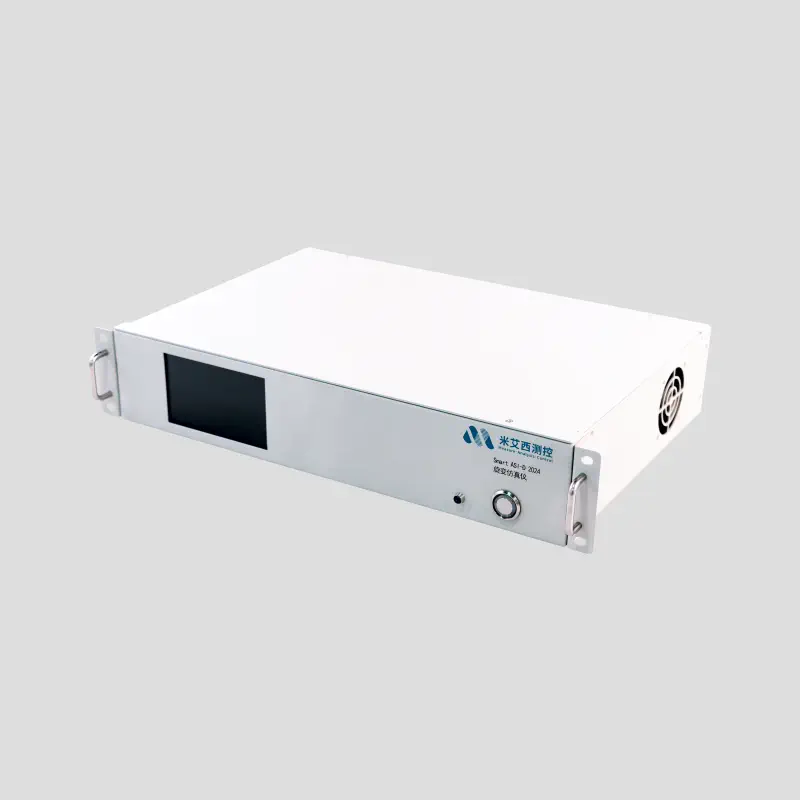
Smart ASI-D 2024-Resolver Simulator
Product Overview
Smart ASI-D 2024 resolver simulator is a resolver simulator tailor-made for the development and testing needs of resolver decoding systems in the new energy field. This product integrates the essence of the company's high-precision simulation technology, and innovatively adds a number of special functions based on industry characteristics. It is widely used in new energy vehicles, industrial control, aerospace and other fields to help users quickly complete controller performance testing, algorithm optimization and reliability verification.
Smart ASI-D 2024 resolver simulator has the following highlights:
Comprehensive simulation functions: covering static angle simulation, uniform speed dynamic simulation, and dynamic linear acceleration and deceleration simulation to meet the needs of different test scenarios.
Fault injection simulation: It can simulate a variety of resolver fault scenarios, providing users with strong support for discovering and solving problems in advance in practical applications.
High-precision signal synchronous output: The generated sine (SIN) and cosine (COS) signals have high precision and synchronization, ensuring the accuracy of test results.
SmartASI-D2024 resolver simulator (simulator) supports static simulation (accuracy 0.02°) and dynamic simulation (speed error 0.01%) of resolver angle and resolver fault simulation function, which can be programmed in real time. It is suitable for resolver decoding verification, controller reliability and performance testing, motor simulation testing and other occasions. The price is only about one-tenth of the 5330A, making it a cost-effective resolver simulation solution. For measurement needs, our company also has a resolver standard source with 1″ angle simulation accuracy to choose from.
Performance beyond similar products: More dynamic and static angle simulation functions and higher performance have obvious advantages over similar products on the market, bringing users a more efficient and reliable testing experience.
Product Features
High-precision simulation:
Electrical angle accuracy ±0.1° (optional: 0.02° high accuracy).
Speed error ≤ ±0.01% (speed less than 10000 RPM)
≤±0.02% (speed less than 20000 RPM)
≤±0.05% (speed greater than 30000 RPM).
Multi-function configuration:
Supports 1~128 pole pairs and 0~1.000 ratio coefficient.
can simulate the motor acceleration/deceleration process (linear frequency modulation).
Fault injection function:
Supports signal loss (0%~100%), phase deviation (0~359.99°), short circuit, noise and other fault simulations.
Multi-channel support:
Optional 1~2 channels, supporting multi-channel independent synchronous testing.
Multiple excitation signal modes
Both internal and external excitation signals are supported, and the output excitation signal output can be configured.
Secondary development support:
Provides secondary programming SDK library and windows, linux, C#, QT library software based on Labview to adapt to automated testing systems.
Product performance indicators
| Name | Performance indicators |
|---|---|
| Size | 19-inch 2U, supported on shelves |
| Power supply | AC220V/DC12V |
| Communication interface (DB9) | Optional RS232, CAN, RJ45 |
| indicator light | Power light, status indicator light |
| Maximum rated power | 50W |
| Operating temperature | 0-50℃ |
| Storage temperature | 0~50℃ |
| Human-machine interface | 5-inch touch screen |
| Number of channels | 2 channels. Supports 3 application scenarios: 1. Dual resolvers independent 2. Dual resolvers redundant 3. Dual-channel resolvers |
| Speed range | 0~±60000RPM Select the appropriate excitation frequency at different speeds. Other speed ranges are optional. |
| Resolution | 1RPM, optional: high resolution 0.1°dps (0.017RPM) |
| Steering | clockwise, counterclockwise |
| Electrical angle | 0~359.999° |
| Electrical angle accuracy | 0.1° optional: 0.02° (high precision) |
| Electrical angle setting resolution | 0.001° |
| Polar log range | 1~128 |
| Transformation ratio | 0~1 |
| Excitation differential input voltage amplitude | ≤22Vpp |
| Excitation differential input waveform | Sine wave |
| Excitation differential input signal frequency | 10KHz, optional wide frequency range: 400Hz to 20kHz |
| Output voltage | ≤22Vpp, transformer isolation/non-isolation |
| Amplitude error | ≤±0.2%, transformer isolation/non-isolation |
| Load current | ≤200mA, transformer isolation/non-isolation |
| Nonlinearity | ≤±0.15%, transformer isolation/non-isolation |
| Amplitude deviation between sine and cosine channels | / |
| Speed error between sine and cosine channels | ≤±0.01% (speed less than 10000) ≤±0.02% (speed greater than 20000) ≤±0.05% (speed greater than 30000) |
| Phase error between sine and cosine channels | <0.1° |
| Phase displacement between excitation and line simulation real cosine | 0~360° |
| Phase shift accuracy | 0.1° |
| Temperature sensor | 2 way |
| Temperature analog voltage | Voltage simulation: 0~5000mV, resolution: 1mV |
| Analog output motor speed | Minimum speed 0.1°/s (0.0167RPM), 0~±60000RPM |
| can simulate motor acceleration | Minimum acceleration value 1RPS |
| Support fault injection function | SIN loss percentage: 0~100% COS loss percentage: 0~100% Sine and cosine phase deviation angle: 0~360°, resolution 0.1° Sine and cosine short circuit and missing noise injection Sine and cosine phase deviation, resolution 0.01° (optional) |
| Number of pole pairs, adjustable transformation ratio | Number of pole pairs: 1~128 Transformation ratio: 0~1 (default 0.286) |
| Static electrical angle output | Angle: 0~359.999°, accuracy 0.01°, other accuracy (optional) |
| Support Modbus / RS232 programmable control | Communication protocol: Modbus Baud rate: 115200, 8, N, 1 |
| CAN communication | Bus protocol: CAN 2.0B, bus baud rate: 500Kbps (optional) |
| RJ45 Ethernet | TCP/IP protocol (optional) |
| Secondary development | Provides secondary programming SDK library and windows linux, C#, QT library software based on Labview |
Instructions for use
4.1 Unpacking inspection
Confirm that the product model is consistent with the order information.
Check whether the packaging box is intact. If it is damaged, please contact after-sales service in time.
Take out the product and check whether there are scratches, damage or other quality problems on the appearance.
Check the list of random accessories to make sure they are complete.
4.2 Usage environment
Ambient temperature: 0℃~+50℃;
Relative humidity: 10% ~ 95%, no condensation;
Environment: no vibration, dust, corrosive gas, flammable gas, oil mist, water vapor, dripping water or salt, etc.;
Atmospheric pressure: 86~106Kpa;
Storage temperature: 0℃~+50℃;
4.3 Wiring method
Front panel (the front panel of model A and model B is the same)
| Serial number | Name | Description |
|---|---|---|
| 1 | screen | is used to display |
| 2 | Power on/off button | Used to switch the device on and off |
| (Type A) serial number | Name | Description |
|---|---|---|
| 1 | Power interface | is used to power the device |
| 2 | Main power button | Switch for main power to the device |
| 3 | Channel 1 interface | Channel 1 signal output, SIN and COS output, ES IN is the external excitation connected, ES is the excitation output generated by the device |
| 4 | Channel 2 interface | Channel 2 is the same. |
| 5 | Channel 3 interface | It is currently closed and channel 3 is not open. |
| 6 | Channel 4 interface | It is currently closed and channel 4 is not open. |
| 7 | Temperature interface | Interface for two analog temperature signal outputs |
| 8 | RS232 interface | for RS232 communication interface |
| 9 | CAN interface | for CAN communication interface |
| 10 | Network port | is used for network port communication |
Usage steps:
With excitation signal mode: Connect EXC IN, SIN, COS signals through BNC interface.
Without excitation signal mode: Use BNC interface (SIN, COS, ES output signals).
Front panel touch screen settings: Connect the rear panel to the DC12-15V/AC220 power cord. After powering on, turn on the power and set the parameters on the front panel to run.
4.4 Interface description
Excitation signal input: ES IN interface (EXC).
ES output: EXC output signal interface (EXC).
SIN/COS output: BNC interface (differential signal).
4.5 Additional functions
2-way programmable resistance module, configure the corresponding temperature sensor simulation through the touch screen.
Configurable interface refresh frequency. Real-time updates refresh data to the screen. The screen brightness can be adjusted freely.
Multi-language version, supporting both English and Chinese versions.
Operating Instructions
5.1 Touch screen parameter setting
After starting up, you need to set the required parameters first, and then start running the work.
Step one: After booting, you need to wait for the screen status light to turn green before proceeding. After it turns green, the user first operates to set the number of pole pairs and the transformation ratio. The default number of pole pairs of the device is 4, and the transformation ratio is 0.5.
Step 2: Set the required excitation signal frequency and voltage, and select internal/external excitation signals for control.
Step 3: After setting the above required parameters, select the corresponding mode. There are three modes in total. They are (angle mode) static angle simulation, (speed mode) uniform rotation simulation, (acceleration mode) rotation acceleration and deceleration simulation. After selecting, proceed to the settings in the established mode. Set angle, speed and acceleration parameters.
Step 4: After setting, open the corresponding channel.
Special reminder: This instrument has a memory function. The set parameters can be saved after power off.
5.1.1 Main interface overview
5.1.2 Core parameter configuration
Channel selection control:
Select the working channel through the touch screen. The left side of the interface is the channel 1 activation area (dark blue logo), and the right side is the channel 2 control area. On the left is channel one. The dual-channel independent configuration system supports synchronous parameter display and status monitoring.
Run mode configuration:
After selecting the channel, select the working mode through the main interface mode switching control, which supports angle/velocity/acceleration three-state switching.
Each mode corresponds to an independent control interface (see Figure 3), which dynamically displays the current working mode.
Winding parameter configuration:
Each channel configuration menu provides Pole Pairs and Voltage Ratio settings:
Pole-to-pole range: 1-128 (integer step, exceeding the limit value triggers a system alarm)
Transformation ratio range: 0-1.000 (three decimal places accuracy)
Auto calibration: On by default. The function is currently not available.
Operation instructions: Select the red functional area to activate the numeric keyboard interface. After confirmation, the parameters are automatically written to the register (see Figure 4 for the setting interface). Note: The input value will be rounded (for example: input 1.8 is recorded as 1 pair of poles).
Excitation signal management:
Point signal source selection
Switch the internal/external excitation source through the interface in Figure 5, and it will take effect only after confirming the operation.
Signal parameter settings
Excitation voltage: 0.0V-7.0V (one decimal place accuracy, over-limit lock input)
Excitation frequency: 400Hz-20000Hz (integer setting)
Fault injection
Sine/cosine phase displacement angle setting: 0-359.99° (two decimal places precision) type. A value of 0 is an offset relative to the set angle. The signal is shifted to the left to 0. At this time, the sine/cosine phase displacement injection has no effect.
The three fault types are multiple selections, and multiple faults can be superimposed. After setting the fault type, it will take effect only after the channel is opened. Otherwise it is invalid. Click "None" to completely clear the fault. Otherwise, multi-select and cancel cannot clear the fault.
Step size setting
Supports two step settings: timing and manual setting of angle step. The interface settings are as shown in the figure, and the timing step and manual step can only be selected in one way, that is, the timing step cannot be used after the timing step is enabled, and the timing step enable switch on the main interface is invalid. Can't touch. When the timing step is turned on and enabled, the step plus and minus signs only represent the direction, and the step cannot be added or subtracted. Click the step size in the picture to enter the step size setting interface
A timing number of 0 is an infinite loop. 1 time means adding the corresponding step once. For example: if the original angle is 0 degrees and the step is 20 degrees, adding 2 times is 40 degrees.
Temperature setting
Supports dual-channel temperature and voltage simulation, with a range of 0-5000mV (integer setting). For details on the voltage-temperature conversion coefficient, please see the technical appendix.
System global settings
Application parameter configuration
Unit switching: switching between angle unit and speed unit, click the target unit control → it will take effect immediately after confirmation
Human-computer interaction settings
Refresh frequency
Refresh frequency: adjustable from 60ms to 250ms, which affects the real-time data synchronization rate. Click "OK" to set up successfully. Click "Cancel" to keep the previous value.
Brightness adjustment
Brightness adjustment: 30%-100% linearly adjustable, default value 80%
Speaker volume
Audio management: 0-100% digital volume control, 0 value enables silent mode
Multi-language settings
Currently switching between Chinese and English in real time
Version information
The version update function is being updated. Please pay attention to the update of the latest version manual. The current version update interface
5.1.3 Static angle simulation
The default channel selection is channel one, and its working mode is the static angle analog output function. Click the "045.000" area in the middle of the angle to enter the static angle setting interface. After setting the angle, click the start icon in the upper right corner to start static angle output.
5.1.4 Uniform rotation simulation
The resolver simulator provides a constant speed rotation simulation function, which supports up to ±60000RPM (according to the change in the number of pole pairs, the speed setting range will change accordingly). It allows different set speeds under different excitation frequencies. After the working mode is selected as "Speed" mode, click the "00006.010" position of the center area data under the mode to enter the speed setting interface. After setting the speed, click the start icon in the upper right corner to start outputting the rotation angle at a constant speed. After clicking the forward/reverse button on the setting interface, the forward/reverse icon on the main interface will be displayed in real time. The icon indicates forward rotation and the icon indicates reverse.
5.1.5 Rotation acceleration and deceleration simulation
The emulator supports linear acceleration and deceleration settings. Configure the initial speed, speed change rate and duration. Click the start button to perform linear acceleration and deceleration angle simulation within the set time range. Set forward and reverse, and the direction display is consistent with the speed direction display above. Set the positive and negative values of the rotational speed change rate. Positive numbers represent acceleration and negative numbers represent deceleration. The duration of the main interface is used for dynamic countdown. The countdown will be displayed during acceleration, and the execution status will display the running icon. When the countdown ends, the completed status will be displayed. If the countdown is not completed and stops midway, an interruption prompt will be displayed to indicate termination, and the acceleration process will no longer continue to accelerate. It will accelerate again when it is restarted.
5.2 Host computer parameter setting
Host computer parameter setting (Smart ASI-D 2024 host computer instructions)
Note:
Supports both modes with and without excitation signals.
Avoid user errors. Use ES IN and ES to differentiate.
If the product under test has an output excitation signal, connect it to the BNC interface marked ES IN. If the product under test does not output an excitation signal, connect it to the BNC interface marked ES.
The Sin and Cos signals of the device also use the output form of the BNC interface. This series of products also supports two management configuration protocol interfaces, RS232 and CAN.
If the user needs a high-precision programmable resistor to simulate a temperature sensor, a programmable resistor can be optional.
Communication protocol
6.1 Resolver simulator Modbus communication protocol technology analysis
6.1.1 Communication interface and protocol parameters
Physical interface: RS232 serial communication interface
Protocol standard: Modbus protocol
Communication parameters:
Baud rate: 115200 bps
Data bits: 8 bits
Check digit: None (N)
Stop bit: 1 bit
Device address: Default slave address 01H
Function code definition:
Read register: 03H
Write a single register: 06H
Channel selection:
Channel 1: Register 80H
Channel 2: Register 81H
Function code register definition: See the protocol document analysis for details.
Data register definition: See the protocol document analysis for details.
6.1.2 Key register definition
00H: Speed setting register
Function: Set the resolver simulator output speed.
Data range:
Calculation formula: maximum speed = (100 * 60 / number of pole pairs).
Example (default pole number 4): 0∼1500 rpm
Data format: 16-bit unsigned integer, unit is rpm.
02H: Transformation ratio coefficient setting register
Function: Compensate for signal amplitude attenuation (such as long cable scenarios).
Data range: 0∼0.500 (default value 0.286)
Data format: Please refer to the protocol document.
04H: Pole pair number setting register
Function: Configure the number of pole pairs of the resolver signal.
Data range: even sequence 2,4,6,8,10... (default value 4)
Data format: 16-bit unsigned integer.
Example:
Set the rotation speed to 1500rpm: 01 06 80 00 05 DC A2 C3
Maintenance
Pay attention to waterproofing and dustproofing during daily use to prevent liquid from entering the instrument and causing damage.
It is strictly prohibited to disassemble and repair it by yourself. If you encounter any problems, please contact professionals.
Regularly check the operating status of the equipment. If there is any abnormality, please contact after-sales service in time.
Notes
Please perform installation, operation and maintenance under the guidance of professionals.
It is prohibited to use this product in flammable, explosive, humid and other dangerous environments.
When cleaning, please wipe the surface of the case with a clean and soft cloth, and do not rinse it directly with water.
Unplug the device if it will not be used for a long time.
After-sales service
Warranty period: This product enjoys a one-year quality guarantee period from the date of purchase. During the warranty period, if the product has quality problems, we will repair or replace it for you free of charge.
After-sales response time: When you encounter a problem and contact us, we will respond within 48 hours to communicate with you and provide a solution.
After-sales service process: If your product requires after-sales service, please call our customer service number or contact us through the official website and email, and describe the product problems and related situations to the customer service staff in detail. Customer service staff will provide you with preliminary solutions based on your description. If you need on-site service, we will arrange for professional technicians to contact you and make an appointment for on-site service.
Maintenance method: During the warranty period, for product failures caused by non-human reasons, we will repair or replace faulty parts free of charge. If the fault exceeds the scope of the warranty, we will charge reasonable repair costs and parts costs based on the actual situation. After the repair is completed, we will conduct a comprehensive inspection of the product to ensure normal operation of the product.
Customer Feedback: We take customer feedback very seriously. During the after-sales service process, we will keep you informed of your satisfaction with the service. If you have any suggestions or complaints about our services, please feel free to contact our customer service staff, we will be happy to solve your problems and continuously improve the quality of our services.
Thank you for choosing Smart ASl-D 2024 series products, and wish you a happy use!